AI Face Studio
Mix a new hairstyle, hair color, beard, makeup and outfit on your photo.
Upload a clear photo of yourself
Front-facing · good light · just you in the photo
Uploaded only when you tap Generate · deleted within 24 hours
Sign in required · failed images are refunded automatically · adults 18+ only
Example result
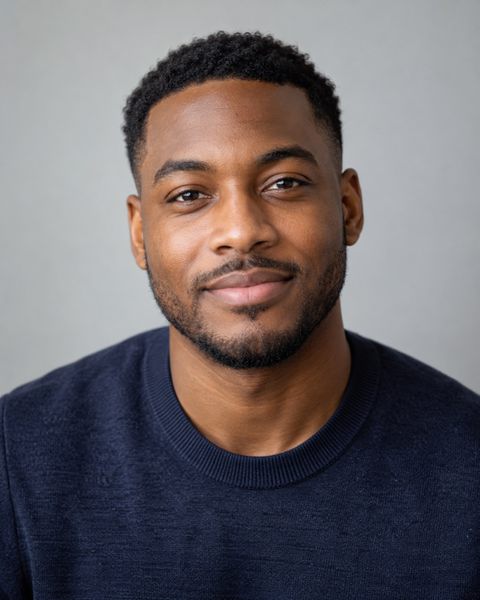
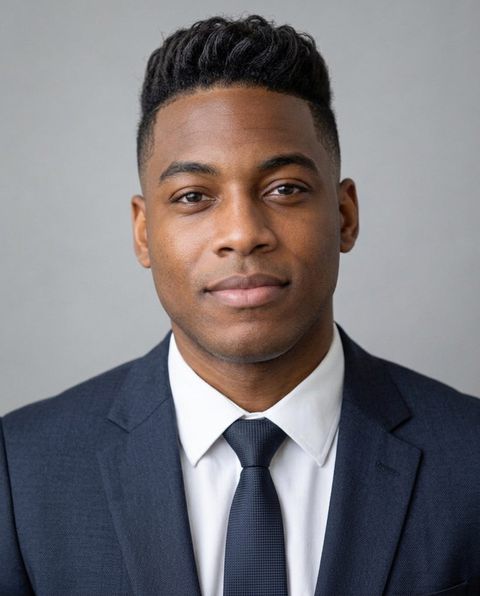
Made with this tool on a sample photo of a fictional person.
For adults 18+, for entertainment and self-improvement. Scores reflect geometry in one photo, not your worth. Terms
How it works
- 1Upload a photoA straight-on photo at eye level, neutral face, good light. Or take a selfie.
- 2We measure in your browser478 landmarks are mapped on your device and small head turns are corrected. The photo is never uploaded.
- 3Get your ai face studio resultSee the numbers with the lines drawn on your photo. Same photo, same result, every time.
AI Face Studio edits your own photo with the changes you choose: a new hairstyle, hair color, facial hair, makeup or outfit, in any combination. Pick the options, generate, and see the look on your real face — everything you did not choose stays the same, so it is easy to compare.
What is the AI Face Studio?
The AI Face Studio is a photo editor for your look: choose a new hairstyle, hair colour, facial hair, makeup or outfit, in any combination, and get one realistic image of yourself with those changes. Anything you leave on "keep" stays exactly as it is.
It is built for questions like "would I suit a buzz cut?", "what would I look like blonde?" or "should I grow a beard?": one edit, on your own face, without a salon visit.
What can you change on your photo?
There are five groups of options:
- Hairstyle: short crop, buzz cut, textured quiff, slick back, curtain bangs, long layers, shoulder-length bob, pixie cut, long waves, curly volume or braids.
- Hair colour: jet black, dark brown, chestnut, honey blonde, platinum blonde, copper red, ash grey or pastel pink.
- Facial hair (men): clean shaven, light stubble, short boxed beard, full beard or mustache.
- Makeup: none (removes makeup), natural, soft glam or bold evening.
- Outfit: business suit, smart casual, streetwear, elegant evening or athletic.
Pick at least one change. Each generation makes one image and starts from your original photo, so you can try a different combination next time without stacking edits on top of the last result.
How to change your hairstyle and hair color on a photo
Choose a hairstyle, a colour or both, leave the other options on "keep", and tap Generate. The model is told to make only those changes and keep your face, skin tone, pose and background the same.
Changing the cut and colour together shows the full look at once: a platinum pixie, a copper bob, dark brown curtain bangs. Changing one at a time tells you which part you actually like. If you want to compare several haircuts at once, the AI hairstyle try on renders six cuts in one go in your natural colour.
Beard filter: see yourself with or without a beard
For men, the facial hair option works like a beard filter in both directions. Choose light stubble, a short boxed beard, a full beard or a mustache to see what growing one would look like, or choose clean shaven to see your face without the beard you have now.
It is a quick way to decide before committing weeks of growth or a shave you cannot undo. A beard can change how the jawline reads, so try it alongside your current haircut first, then with a new one.
Makeup and outfit changes
The makeup option applies natural, soft glam or bold evening makeup, or removes makeup with "none". Natural evens tone and adds a little definition; soft glam adds more eye and lip colour; bold evening is for a night-out look. Removing makeup is useful if you want to see your bare-faced starting point.
The outfit option dresses you in a business suit, smart casual clothes, streetwear, an elegant evening look or athletic wear. It is handy for picturing a profile photo, a work headshot or an event outfit. For which colours to wear, the color analysis suggests a palette for your skin tone.
Ideas to try in the Face Studio
Some combinations people often want to see:
- A bold colour test: keep your cut and switch to platinum blonde, copper red or pastel pink before you commit to bleach.
- The big chop: long layers to a pixie cut or shoulder-length bob, with your current colour.
- Beard or no beard: a full beard against clean shaven, one image each, to compare jawlines.
- Work headshot: natural makeup or a tidy beard with a business suit.
- Night out: soft glam or bold evening makeup with an elegant evening outfit.
For a ready-made set rather than your own picks, the AI glow up generator makes five images at once: a full glow up plus hairstyle, grooming, skin and style on their own.
Will the AI keep my face the same?
That is the main instruction. Every edit asks the model to keep your face shape, eyes, nose, mouth, skin tone, ethnicity, age and identity unchanged, and to change nothing except what you picked. In most photos the result reads clearly as you.
It is not flawless: strong shadows, glasses, a tilted head or a small, distant face can let features drift a little. A front-facing, well-lit head-and-shoulders photo with only you in it gives the closest likeness.
Price and privacy
Each Face Studio image costs 25 credits, whatever combination you choose, and you need to sign in. Credits are one-time packs with no subscription, and they never expire. If a generation fails, the credits are refunded automatically.
Your photo is uploaded only when you tap Generate. The photo and the generated images are deleted within 24 hours, are never used for training and are not kept in your account, so tap Save on the ones you want. Each image carries an "AI-generated" label in its metadata. For adults 18 and over.
Frequently asked questions
What can I change in the AI Face Studio?
Hairstyle, hair colour, facial hair (for men), makeup and outfit. Choose any combination; anything left on "keep" stays as it is in your photo.
Can I see myself with a beard or without one?
Yes. Men can choose light stubble, a short boxed beard, a full beard or a mustache, or choose clean shaven to see their face without a current beard.
Can I change my hair color and hairstyle at the same time?
Yes. Pick both and they appear together in one image — for example a platinum pixie cut or a copper shoulder-length bob.
Can I remove makeup from a photo?
Yes. Set makeup to "none" to remove it. You can also apply natural, soft glam or bold evening makeup.
Does each edit build on the last one?
No. Every generation starts from your original photo, so a new combination never stacks on top of the previous result.
How much does the Face Studio cost?
Each image costs 25 credits, whatever combination you choose, and you need to sign in. Credits are one-time packs with no subscription, they never expire, and failed generations are refunded automatically.
Will the edited photo still look like me?
It is designed to. The AI is told to keep your face, skin tone, ethnicity and identity and change only what you picked. A clear, front-facing, well-lit photo gives the closest likeness.
Do you keep my photo or the generated images?
No. Your photo is uploaded only when you tap Generate, and both the photo and the generated images are deleted within 24 hours. They are never used for training and are not saved to your account, so tap Save to download the images you want to keep.