AI Hairstyle Changer: Hairstyle Try On
Six haircuts on your own photo before you visit the salon.
Upload a clear photo of yourself
Front-facing · good light · just you in the photo
Uploaded only when you tap Generate · deleted within 24 hours
You'll see 6 styles
Long soft layers · Curtain bangs · Shoulder-length bob · Pixie cut · Beach waves · Sleek high ponytail
Sign in required · failed images are refunded automatically · adults 18+ only
Example result
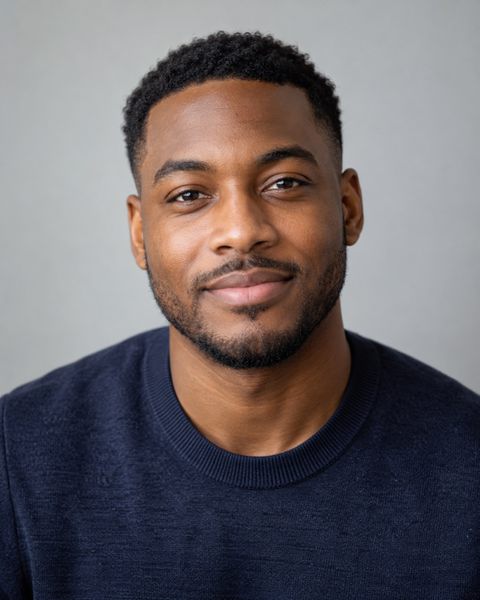
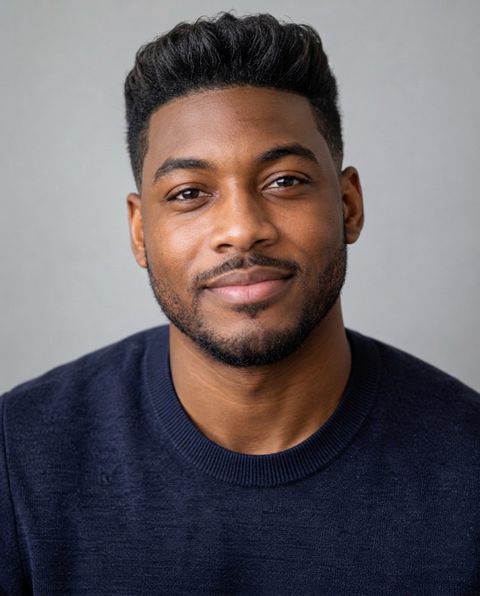
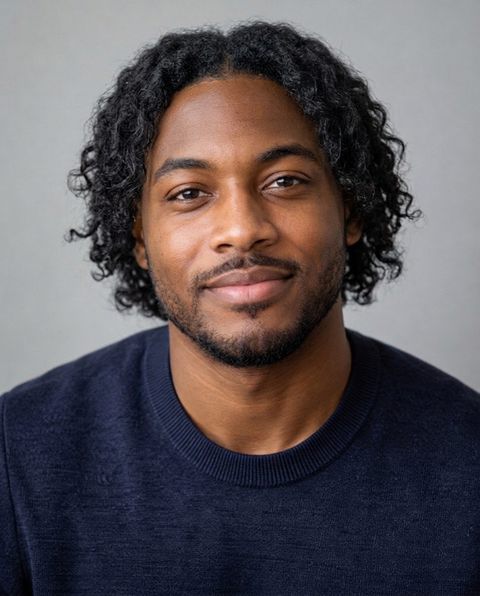
Made with this tool on a sample photo of a fictional person.
For adults 18+, for entertainment and self-improvement. Scores reflect geometry in one photo, not your worth. Terms
How it works
- 1Upload a photoA straight-on photo at eye level, neutral face, good light. Or take a selfie.
- 2We measure in your browser478 landmarks are mapped on your device and small head turns are corrected. The photo is never uploaded.
- 3Get your ai hairstyle try on resultSee the numbers with the lines drawn on your photo. Same photo, same result, every time.
An AI hairstyle try on puts new haircuts on your own photo. Upload a selfie and this hairstyle changer renders six popular cuts for men or women on your face — keeping your features and natural hair color — so you can compare them side by side and show the one you like to your barber or stylist.
How does the AI hairstyle try on work?
The AI hairstyle try on puts six haircuts on your own photo in one go. Upload a selfie, choose the men's or women's set, tap Generate, and you get six images of yourself, each with a different cut and the rest of the photo left alone.
Each image is generated with instructions to change only the hair: your face, skin tone, pose, background and natural hair colour stay the same. That makes the six results easy to compare side by side, since the only thing that differs is the haircut.
Which hairstyles can I try on?
The set is six popular, wearable cuts for each gender:
- Men: textured crop, classic side part, modern quiff, medium-length flow, buzz cut with skin fade, and curly top with taper fade.
- Women: long soft layers, curtain bangs, shoulder-length bob, pixie cut, beach waves, and sleek high ponytail.
The lists cover short, medium and long lengths, with and without a fringe, so most people find at least one direction they had not considered. Want a specific cut that is not on the list, like braids, a slick back or long waves? The AI Face Studio lets you pick one hairstyle from a longer menu and combine it with a new colour, beard, makeup or outfit.
Is this AI hairstyle changer realistic?
It aims for photorealistic results: real hair texture, natural shading and your own hair colour, on your own face. The instructions ask the model to keep your identity, features and skin tone exactly as they are, so the image looks like you after a haircut rather than a stranger.
It is still an AI picture, not a guarantee of how a cut will fall on your real hair. Texture matters: very fine or very curly hair may not hold a style the same way the image shows. Use the results to narrow your choice, then talk through the cut with your barber or stylist.
What haircut should I get?
Get the cut that balances your face shape and suits your hair type. The try on lets you check that by eye instead of guessing. A few rules hold for most people: round faces gain from height on top, long faces from width at the sides, and strong jaws from softer texture.
Not sure of your face shape? The face shape detector measures it in your browser for free. For named recommendations with reasons, styles to avoid and a brief for your barber, use the hairstyle finder, then try the shortlisted looks here.
Can I try on a new hair color too?
Yes, but in the Face Studio rather than this six-cut set. The try on keeps your natural colour on purpose, so you judge the cut alone. In the Face Studio you can choose a colour — jet black, dark brown, chestnut, honey blonde, platinum blonde, copper red, ash grey or pastel pink — with or without a new hairstyle, and see it on your photo.
A tip for colour: shades that follow your skin's undertone usually look the most natural. The color analysis finds your colour season and suggests hair colours for it.
How to take a photo for a hairstyle try on
Use a front-facing photo in daylight with your hairline and the sides of your face visible. Pull long hair back or behind your shoulders if it covers your forehead or jaw, because the model needs to see your head shape to fit a new cut. No hats, no filters, and only you in the frame.
Head-and-shoulders framing works best, because longer styles such as layers and waves need room below the chin.
Short or long: testing a big change before the salon
A try on is most useful before a change you cannot undo quickly. Going from long hair to a pixie cut or a bob, or from a full head of hair to a buzz cut with skin fade, takes seconds at the salon and months to grow back. Seeing the cut on your own face first takes most of the guesswork out of it.
Look at each image at normal phone size, the way other people will see you, rather than zooming in. Then ask which ones still look like you on an ordinary day. A cut that only works with perfect styling is harder to live with than one that looks good straight out of bed.
When you have a favourite, save it and show it to your barber or stylist together with a photo of your current hair, so they can tell you how close your hair type can get.
Is there a free hairstyle try on?
Generating images is not free here: the six-hairstyle set costs 50 credits and you need to sign in. Credits are one-time packs with no subscription, and they never expire. If a generation fails, the credits are refunded automatically.
Your photo is uploaded only when you tap Generate. The photo and the generated images are deleted within 24 hours, are never used for training and are not kept in your account, so tap Save on the ones you want. Each image carries an "AI-generated" label in its metadata. For adults 18 and over.
If you only want free advice, the face shape detector costs nothing, and the hairstyle finder names your best cut for free.
Frequently asked questions
How can I see what a hairstyle looks like on me?
Upload a selfie, choose the men's or women's set and tap Generate. The AI hairstyle try on renders six haircuts on your own photo, keeping your face and natural hair colour, so you can compare them side by side.
Which haircuts are included?
Men: textured crop, classic side part, modern quiff, medium-length flow, buzz cut with skin fade and curly top with taper fade. Women: long soft layers, curtain bangs, shoulder-length bob, pixie cut, beach waves and sleek high ponytail.
Is there a free AI hairstyle changer?
Not here. The six-haircut set costs 50 credits and you need to sign in. Credits are one-time packs with no subscription, they never expire, and failed generations are refunded automatically. The face shape detector and the hairstyle finder's main result are free if you only want advice.
Can I try a hair color on my photo?
Yes, in the AI Face Studio. The try on keeps your natural colour so you judge the cut alone; the Face Studio lets you pick colours such as honey blonde, platinum, copper red, ash grey or pastel pink, with or without a new cut.
Can I choose my own hairstyle?
The try on uses a fixed set of six popular cuts. To pick one specific style — for example braids, slick back or long waves — use the AI Face Studio.
Will the haircut look exactly like the image?
Not necessarily. The image is a realistic AI preview, but your real hair texture, density and hairline decide how a cut falls. Use it to narrow your choice, then talk it through with your barber or stylist.
Do I need to download an app?
No. The try on runs on this website in your phone or desktop browser. Tap Save on each image to download it.
Do you keep my photo or the generated images?
No. Your photo is uploaded only when you tap Generate, and both the photo and the generated images are deleted within 24 hours. They are never used for training and are not saved to your account, so tap Save to download the images you want to keep.