Buzz Cut Filter: See Yourself With a Buzz Cut
Try a buzz cut on your own photo before the clippers come out.
Upload a clear photo of yourself
Front-facing · forehead and ears visible · just you
Uploaded only when you tap Try it · deleted within 24 hours
Buzz cut style
Sign in required · HD, no watermark · failed images are refunded · adults 18+
Example result
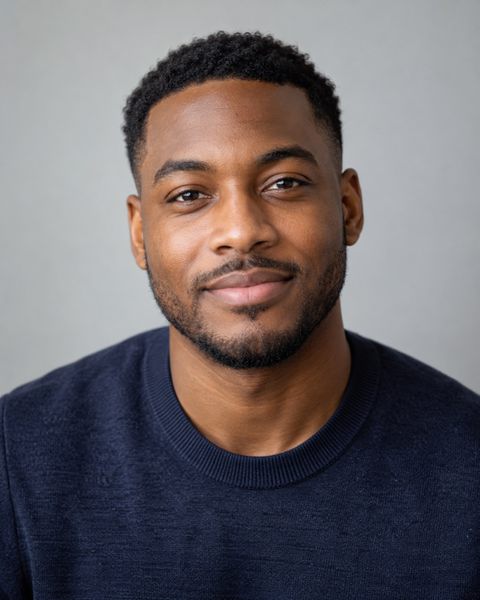
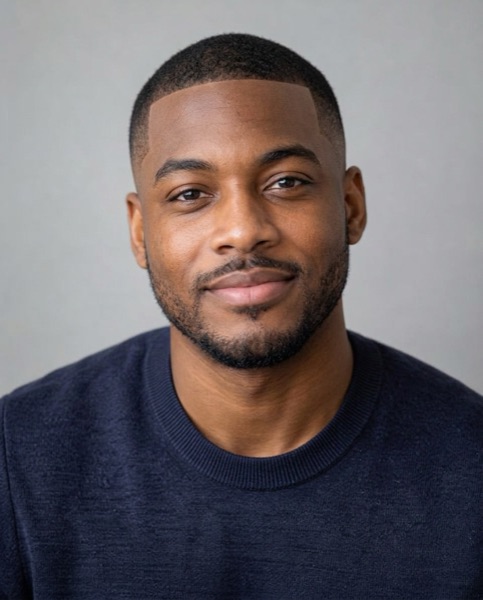
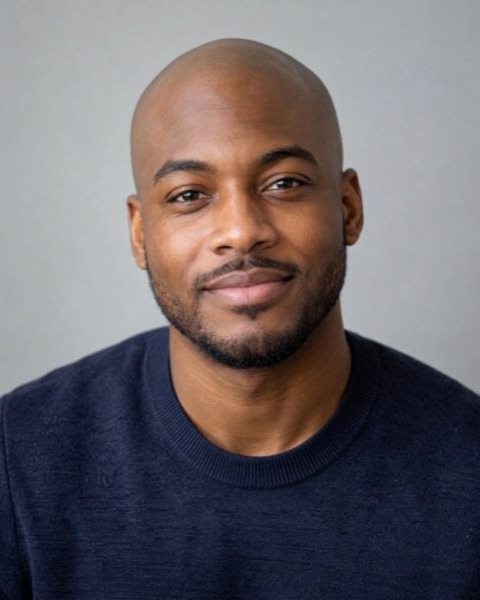
Made with this tool on a sample photo of a fictional person.
For adults 18+, for entertainment and self-improvement. Scores reflect geometry in one photo, not your worth. Terms
How it works
- 1Upload a photoA clear, front-facing photo of just you in good light. Adults 18+ only.
- 2Pick a style and generateYour photo is uploaded only when you tap the button and is deleted within 24 hours.
- 3See the new look on youYour first preview is free on this device; unlock the HD photo with credits if you like it.
A buzz cut filter shows your own face with the hair clipped short, so you can see your head shape, hairline and ears before you commit. Upload a selfie, pick a classic buzz, burr, crew cut, skin fade, bleached buzz or fully bald, and the AI renders it on your photo. Your first preview is free; the full HD photo costs 25 credits.
How does the buzz cut filter work?
The buzz cut filter edits your own photo: it removes the longer hair and draws a short, even buzz that follows your real hairline, with your scalp, ears and head shape showing the way they would after a clipper cut. Everything else stays as it was — your face, skin tone, expression, clothes and background.
You choose one of six looks:
- Classic buzz (#2): about 6 mm all over. The look most people mean when they say "buzz cut".
- Burr cut (#0–1): about 3 mm, so the scalp shows through. The boldest version.
- Crew cut: short, tapered sides with a little more length on top. The safest first step.
- Buzz with skin fade: about 6 mm on top fading to bare skin at the sides, with a crisp line-up.
- Bleached buzz: a classic buzz in bright platinum blonde.
- Shaved bald: everything off with a razor, eyebrows and beard left as they are.
It works on both men and women. Pick "Woman" and the filter keeps earrings, makeup and the rest of your look exactly as they are, changing only the hair.
What would I look like with a buzz cut?
The honest answer depends on three things the filter makes visible: the shape of your head, your hairline, and how your ears sit. Long hair hides all three, which is why a buzz cut is hard to imagine and why so many people are surprised, in both directions, after the first cut.
Look at your preview with these questions in mind:
- Head shape: is the back and top of the head smooth and rounded, or are there flat spots and bumps? A smooth curve suits a very short burr; uneven areas look better with a classic #2 or a crew cut that leaves a little length.
- Hairline: a straight, even hairline looks sharp with a skin fade and line-up. A receding or uneven hairline is often less noticeable with a buzz than with longer hair, because there is no contrast between thick and thin areas.
- Ears and jaw: a buzz puts your ears and jawline on show. If they are your best features, go shorter; if not, a crew cut keeps some balance.
One preview is a starting point, not a verdict. Try a second style if the first one feels too extreme — the crew cut is the gentlest step from longer hair.
Should I get a buzz cut? What the preview tells you
If you still like the preview after a day, that is a good sign. A buzz cut is low-maintenance, cheap to keep and grows back, but the first few weeks of regrowth can feel awkward, so it is worth being sure. Use the image the way you would use a fitting room mirror: look at it on your phone the next morning, show it to a friend, and see whether it still looks like you.
The preview cannot tell you how your hair will feel or how your scalp will react in the sun, and it cannot predict the exact shade of your regrowth. It can show you, quickly and privately, whether the overall look works with your face.
Want a broader view before deciding? The hairstyle finder suggests cuts for your face shape and hair type, and the hairstyle try on renders six different haircuts on your photo at once.
Best face shape for a buzz cut
Oval and square faces are usually called the best face shapes for a buzz cut, because the short hair shows off a balanced outline and a defined jaw. That does not mean other shapes are ruled out:
- Round face: a skin fade or crew cut, which keeps a bit more height on top, adds length and reads less round than an even burr.
- Long or oblong face: an even classic buzz, without extra height, avoids making the face look longer.
- Big forehead: a buzz makes the forehead more visible, not less. A crew cut with a little length at the front softens it; the burr makes it most obvious.
- Heart-shaped face: a classic buzz with a beard or stubble balances a narrower chin.
Not sure which shape you have? The free face shape detector measures it from your photo in the browser, without uploading it.
Female buzz cut: seeing it before you shave
For women, a buzz cut is a bigger step, because there is usually much more hair to lose and it takes longer to grow back. That makes a preview more useful, not less. The filter removes long hair, bangs and ponytails completely and renders a realistic short buzz, while keeping your features, makeup and earrings the same, so you see the cut and nothing else.
The bleached buzz is a popular choice to try at the same time, since many people bleach after the first cut while the hair is short. If you want to try a softer short cut first, the AI Face Studio includes a pixie cut and other styles in any hair colour.
Buzz cut for thinning hair or a receding hairline
A buzz cut is one of the most common choices for thinning hair, because short hair removes the contrast between denser and thinner areas. The preview shows how that looks on your head. If the crown or temples are thin, compare the classic #2 with the burr: some people find the shorter cut looks more deliberate.
The filter keeps your natural hairline; it does not add or restore hair. If you want to understand hair loss itself, a dermatologist is the right person to ask.
Buzz cut or fully bald?
"Shaved bald" is in the style list too, so you can put a fully shaved head next to a #2 buzz on the same photo. If thinning hair is the reason you are thinking about it, that comparison is the useful one: some faces look sharper with smooth skin, others with a little stubble on top.
For the bald look on its own — head shape, ears, brows and beard — see the bald filter page.
Buzz cut lengths and clipper guards
Barbers describe buzz cut lengths by clipper guard number. Each guard step adds about 3 mm (one-eighth of an inch):
- #0 (no guard): about 1 mm, almost skin.
- #1: about 3 mm, the burr cut.
- #2: about 6 mm, the classic buzz.
- #3–4: about 10–13 mm, a longer, softer buzz.
When you find a preview you like, tell your barber the style and guard number shown on the label, or show them the saved image. If you are cutting at home, start one guard longer than you think you want — you can always go shorter.
Is the buzz cut filter free?
Your first try is free on each device: you get a low-resolution preview with a watermark, enough to judge the look. If you like it, unlock the same image in full resolution and without the watermark for 25 credits. Unlocking does not generate a new picture, so you get exactly the result you saw. After the free preview, each new buzz cut costs 25 credits and comes straight in HD; you need to sign in for that. Credits are one-time packs with no subscription, they never expire, and failed images are refunded automatically.
Your photo is uploaded only when you tap the button. The photo and the results are deleted within 24 hours, are never used for training and are not kept in your account, so save or unlock the one you like before then. Each image carries an "AI-generated" label in its metadata. For adults 18 and over.
Frequently asked questions
How can I see what I would look like with a buzz cut?
Upload a front-facing selfie, choose a buzz cut style and tap Try it. The buzz cut filter removes your longer hair and renders a short buzz that follows your real hairline, so you see your own head shape, ears and face with the cut.
Is the buzz cut filter free?
The first preview on each device is free: a low-resolution image with a watermark. Unlocking that same image in HD without the watermark costs 25 credits, and every buzz cut after the free one costs 25 credits and comes straight in HD. Credits are one-time packs with no subscription, they never expire, and failed generations are refunded automatically.
Does the buzz cut filter work for women?
Yes. Choose "Woman" and the filter removes long hair, bangs and ponytails and renders a short buzz while keeping your features, makeup and earrings as they are. The bleached buzz is a popular option to try at the same time.
Which buzz cut styles can I try?
Six: a classic buzz (about 6 mm, a #2 guard), a burr cut (about 3 mm, #0–1), a crew cut with a little length on top, a buzz with a skin fade, a bleached platinum buzz, and shaved bald.
What face shape looks best with a buzz cut?
Oval and square faces are the classic match, but round faces suit a skin fade or crew cut that keeps some height, and long faces suit an even buzz without extra height. The preview shows how it looks on your face rather than on a face-shape chart.
Can I see what I would look like bald?
Yes. Choose "Shaved bald" and the filter removes all the hair on your head while keeping your eyebrows and beard, so you can compare bald with a buzz cut on the same photo. The bald filter page opens with that style already selected.
Does a buzz cut make a big forehead look bigger?
Usually, yes: short hair puts the forehead on show. A crew cut with a little length at the front softens it, while the burr cut shows it most. Try both on your photo to compare.
Will the result still look like me?
It is designed to. The AI is told to change only the hair and keep your face, skin tone, ethnicity and identity the same. A clear, front-facing photo with your forehead and ears visible gives the closest likeness.
Do you keep my photo or the generated images?
No. Your photo is uploaded only when you tap Generate, and both the photo and the generated images are deleted within 24 hours. They are never used for training and are not saved to your account, so tap Save to download the images you want to keep.